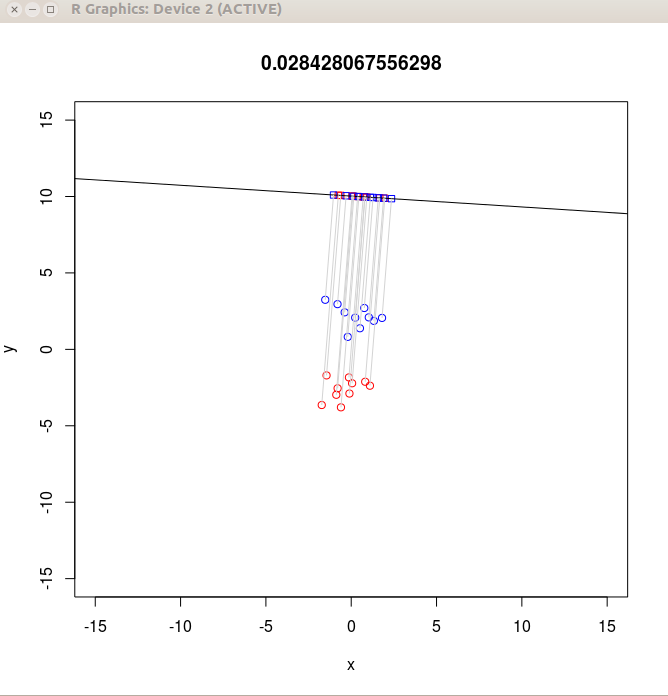
Plot window
#install.packages('deldir')
library(deldir)
x = rnorm(10)
y = rnorm(10)
deldir(x,y,plot=T,wline="tess")
x = 3
f = function() {
  print(x)
  x = 5
  print(x)
}

x #Prints 3
f() #Prints 3 and then 5
x #Prints 3
If you run this, you'll see that initially x
is 3 inside the function, but after the
line x=5 it becomes 5. This is as
expected. But after coming out of the function x
reverts to its old value 3. Thus, any change made
to x outside the function is visible inside the function
as well, but the opposite is not true. So we
call x=5 a local assignment.
Now compare this with the following:
x = 3
g = function() {
  print(x)
  x <<- 5  #This is the only difference from f() above
  print(x)
}

x #Prints 3
g() #Prints 3 and then 5
x #Prints 5
Now the change to x done inside the function
is visible from outside the function as well. The line
x <<- 5 is called a global assignment. Such
assignments are important when different functions need to
communicate with each other via global variables. We shall need
them while using tcltk.
We are going to build something like the interactive animation
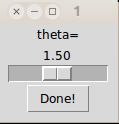
shown above. Our final outcome will consist of two windows: a
main plot window:
genData = function() {
  y <<- c(rnorm(10,mean=-2.5), rnorm(10,mean=2.5))
  x <<- rnorm(20)
  n <<- length(x)
  colour <<- c(rep("red",10),rep("blue",10))

  data = cbind(x,y)

  T = 19* cov(data)

  W <<- 9*(cov(data[1:10,])+cov(data[11:20,]))
  B <<- T-W

  plot(data,xlim=c(-15,15),ylim=c(-15,15),col=colour)
}
Notice the global assignments used for variables that will be
needed outside this function. Just invoke this function as
genData()to see a plot containing only the static part. In step 2 we shall create the control window to change θ . Remember that θ is the link between the control window and the main plot window. We shall need tcltk for this:
showWin = function() {
  require(tcltk)

  tt = tktoplevel() #This creates a blank the control window

  laba = tklabel(tt,text="theta=") #A label saying "theta="


  tva <<- tclVar(1.5) #the variable theta

  #Next we create the slider
  scla = tkscale(tt, command=doit, from=0.1, to=3, reso=0.01,
                     orient="horizontal", variable=tva)

  #and a button
  butt = tkbutton(tt,text="Done!", comm=function() tkdestroy(tt))

  #Finally put everything together
  tkpack(laba,scla,butt)
}
If you call this function like
showWin()a little blank control window will be created, and you'll get an error message saying that doit is not available. This function, which we have called doit, is the main workhorse to dynamically update the plot using the changing value of θ . In step 3 we shall write this function.
doit = function(...) {
The function starts by
reading the value of θ from the control window. The
control window always passes this value in an encoded way, so
that we need to decode it first.
theta = as.numeric(tclvalue(tva))Next comes all the math required to draw the projections. They require little more than high school trignometry and coordinate geometry.
  cosTheta = cos(theta)
  sinTheta = sin(theta)
  r = 10

  a = r/sinTheta
  b = -cosTheta/sinTheta

  vec = c(sinTheta,-cosTheta)
  num = t(vec) %*% B %*% vec
  den = t(vec) %*% W %*% vec
  val = num/den

  b2p1 = b*b+1
  ab = a*b

  px = (x+b*y-ab)/b2p1

  py = a  + b * px
Now we make the plot. Notice that plot everything, both the static as well as the dynamic part, everytime.
  plot(x,y,main=val,xlim=c(-15,15),ylim=c(-15,15),col=colour)
  points(px,py,pch=22,col=colour)
  abline(a=a,b=b)

  for(i in 1:n)
    lines(c(x[i],px[i]),c(y[i],py[i]),col="lightgray")
}
Finally we need to invoke
showWin()to get everything moving!
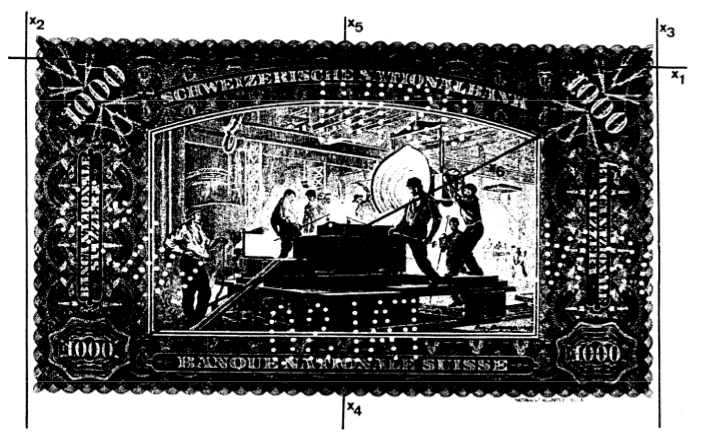
x = read.table('banknote.txt',head=T)
names(x)
We should never right into mathematics, before having a good look
at the data first. Let's make a scatterplot matrix:
plot(x,col=x[,7]+1,pch='.')Well, notice that the shapes of the clusters are sort of elliptical. Also the Diagonal variable has maximum discriminatory power. Top and Bottom put together also does a good job of discriminating. The pair Left nd Right also does a decent job. But Length is totally useless for discrimination. Now let's see what LDA can do for us:
library(MASS)
fit1 = lda(Y~.,data=x)
fit1
Here is part of the output:
Coefficients of linear discriminants:
                  LD1
Length   -0.005011113
Left     -0.832432523
Right     0.848993093
Bottom    1.117335597
Top       1.178884468
Diagonal -1.556520967
Notice that the coefficient of Diagonal has the
largest absolute value (which matches with the impression we got
from the scatterplots: Diagonal has the maximum
discriminatory power).
Next suppose that we have a new banknote with the following
measurements: Length=215.0, Left=130.2, Right=130.1, Bottom=9.5, Top=10.8, Diagonal=138.9.We want to check if it is forged or not. The predict function will help us:
predict(fit1,list(Length=215.0,
                  Left=130.2,
                  Right=130.1,
                  Bottom=9.5,
                  Top=10.8,
                  Diagonal=138.9)) $ class
LDA requires the classes to all have the same Σ
matrix. If this homoscedasticity assumption does not hold, then
we may use Σi for the i-th class. This will
lead to Quadratic Discriminant Analysis (QDA), which is also
available in R:
fit2 = qda(Y~.,data=x)
fit2
Prediction is similar to LDA:
predict(fit2,list(Length=215.0,
                  Left=130.2,
                  Right=130.1,
                  Bottom=9.5,
                  Top=10.8,
                  Diagonal=138.9)) $ class
class(fit1)When you call predict(fit1, etc ) then R first checked the class of fit1 and added that to the name of the function (and put a dot inbetween) to get "predict.lda", and this was the function that was actually called. Similarly for QDA
class(fit2) #returns "qda"Indeed, you can assign whatever classes you want. For example, you can write
class(fit1) = "isi"and then write
predict.isi = function (x) print("It works!")
Now calling
predict(fit1)will print It works!
indGood = rep(1:5,20)Now we shall scramble this:
randPerm = sample(100,100)
indGood = indGood[randPerm]
Now indGood is a vector of length 100 with exactly 20 ones, 20 twos etc but all these are randomly distributed. Let's do the same thing for the bad notes:
indBad = rep(1:5,20)
randPerm = sample(100,100)
indBad = indBad[randPerm]
Now we combine these:
ind = c(indGood,indBad)We shall use all the cases with ind=1 as the test cases, the rest being the training cases:
trn = x[ind!=1,]   # Worked out example
tst = x[ind==1,-7] # Exam problems
truth = x[ind==1,7] # Answer keys to exam problems
Now the teaching starts:
fit = lda(Y ~ . , data = trn )Thus lda plays the role of the teacher, and fit is what the students learn. Now it is time for the exam:
pred = predict(fit , tst)$classHere pred is the student's answer. e have to now compare this with the answer key:
mean(truth!=pred)If we repeat the same procedure 5 times (each time choosing a different train-test partition) then we get 5-fold cross-validation (CV):
err = NULL
for(i in 1:5) {
  trn = x[ind!=i , ]
  tst = x[ind==i,-7]
  truth = x[ind==i,7]

  fit = qda(Y ~ . , data = trn )

  pred = predict ( fit , tst ) $ class
  err[i] = mean ( truth != pred )
}

mean(err)
This approach is very general, and can be used for any supervided
classification method. For example,just replace lda
with qda above to apply CV to QDA.
By the way, what we called "learning by rote" in the
student-teaching analogy, is called overfitting in
statistics. CV is a great way to avoid overfitting.