If you are like me, a dummy in the matter of accounting, but a
computer enthusiast, and you suddenly find yourself in the need
to keep your accounts clear, then Ledger might be just the thing
for you.
The software is just suited for dummies, but its manual is, well,
a bit too long for the likes of me. So here I am writing a short
tutorial.
Accounting, with all its bells and whistles, is a pretty daunting
subject. Being a dummy myself, I do not presume to embark upon a
lengthy exposition. However, this much we all know: money flows
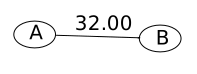
from one place to another. Think of it like an arrow diagram:
Each node (ie, where the arrows start and end) is called
an account. This is standard terminology, and Ledger uses
it. Each arrow is an example of a transaction. Ledger
allows you to associate a date and description with each arrow. Thus
the arrow from A to B can be written as
2016-05-10  My transaction
   A   -32.00
   B    32.00
The negative sign is for the starting account, the positive sign
for the destination account.
The order does not matter. So we could also write it as
2016-05-10  My transaction
   B    32.00
   A   -32.00
As money cannot vanish enroute so the two amounts must always be
the same with opposite signs. So Ledger allows us to abbreviate
this to
2016-05-10  My transaction
   A   -32.00
   B
or
2016-05-10  My transaction
   A
   B    32.00
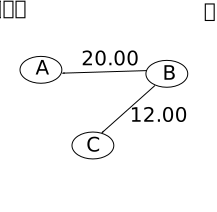
In fact, Ledger often allows arrows to be grouped. For example,
if the arrow diagram is like
then we may
write
2016-05-10  My transaction
   A    20.00
   B    -32.00
   C
or
2016-05-10  My transaction
   A    20.00
   C    12.00
   B
I prefer the second form, as this is easier to read.
If you express the entire diagram like this then you get
a journal file.
To use Ledger for your personal accounting, you need to be able
to draw the arrow diagram for your case. This, unfortunately, is
less easy than it sounds. Let us tackle the difficulties one by
one:
The first difficulty is posed by the term "account". Even a
dummy like me knows how many bank accounts he/she has. So the
natural tendency is to try to draw arrows between these
accounts. If you try to do this, you will find that many
transactions do not "fit". For example, I have a bank
account. Call it A. It earns interest, which is a flow of money,
and hence needs an arrow. The arrow clearly ends at A, but where
does it start from?
The proper way to go about creating the arrow diagram is to list
the flows of money first, and then create accounts out of the two
ends. For example, for a bank account A that earns
interest, I need two accounts, A and interestA,
say. Notice that interestA is not an account in the everyday
usage of the term. But Ledger (and any other accounting system)
calls them accounts as well.
Now that you have generalised the notion of an "account", you
will run into another problem: every flow of money gives rise to
two accounts. So the number of accounts seems to grow everyday!
For example, if you buy coffee and milk and biscuits, should we
create three accounts for the three items? Yes, you
should, if you want to track your expenditure on these
items separately. But most ordinary people (and definitely the
dummies like us) do not want to be that particular. So,
instead, we club the three items under a single account called
"grocery". Deciding when to club multiple minor accounts into one
major account is crucial for the efficient use of Ledger (and any
accounting system, for that matter). Here are some guidelines:
Always keep the number of accounts as low as possible to
make life simple.
Have an account for any head for which you can get
feedback. All your bank accounts and credit cards etc. come in
this category, because your bank provides reports on these. The
feedbacks are important for reconciling your journal with the
real world.
If you need only the aggregate of some heads, then keep only
one account for the aggregate.
Sometimes the above two points lead to contradictory
prescriptions. For example, I do not care much about the amounts
of interests the different banks give. All that I need to know
is the total interest (I need that for my tax return). However,
each bank gives me feedback about its own interest. So here is
an example where I want to consider the two interests as
separate accounts, and also as a combined account. Ledger
provides a mechanism for this, the colon notation. Create two
accounts named like Interest:A and Interest:B. Then whenever you
ask Ledger to compute balances for all the accounts, it will
also show a subtotal for all the Interest accounts.
The colon notation allows you to design a hierarchy of
accounts. It is good idea to spend some time designing hierarchy
that you find intuitive. Don't fall into the trap of using
"standard" accounting jargons for this purpose, like Equity,
Liablity, Asset, etc (as shown in the Ledger
manual). I use the following:
ThePast: This is what I had before starting Ledger.
Income: All sources of income, including salary, interests, etc.
Long: All long term deposits.
Short: All bank accounts and credit cards that allow me to
withdraw money readily.
Expense: I follow an advice given in Ledger manual about
keeping one Expense:Cash account which combines both cash in
hand as well as sundry petty expenses. There is one account for
each other significant expenses.
Take a day off from other chores. Sit down. Relax. Think of all
the flows of money in your life. Draw an arrow diagram (don't
care about the amounts or the dates right now). Decide upon the
accounts you plan to use. Arrange them inn a hierarchy.
Decide upon a starting date (typically the start of a
month). Find the balance on that date of all the accounts that hold money (as
opposed to income accounts and expense accounts).
Now open a text file (call it accounts.txt or whatever you
like). Declare all the accounts like this:
It is not mandatory that you have to declare all the accounts
like this. But I consider it a good practice. Also you can add a
comment after each account to remind yourself about important
facts. An example is shown in red.
Next you declare the unit of currency you plan to use. The
technical term for the unit is commodity.
commodity Rs
Next you need to put the opening balance in the accounts. All
accounts automatically start with 0 balance.
This means Rs 123,345.00 has been put into the account
Short:Bank1 from ThePast. Similarly, Short:Bank2 gets Rs
332,567.00 to start its life with. Notice the *. We shall explain
its use shortly. For now here is simple description: A * means
that transaction is already reconcilded with the outside world.
Fill up the Long accounts similarly.
OK, so your journal is now ready to record your day to day
life. Suppose that you withdraw money from ATM. You need to tell
this to Ledger like this:
This means you transfered Rs 5,000.00 from Short:Bank2 to
Expense:Cash. The * means that it is reconciled with your bank
account. The red label reminds you that this transfer has been
achieved using ATM.
Life rolls on, and one day you spend Rs 45.00 on coffee from the
cash you got from the ATM. You do not care about the petty
cash. So you do not record it in your journal. Then you use the
ATM card as a debit card to pay for a toy costing Rs 40.00. You
have to record this transaction as it will show up in your bank
account, an you want to keep your journal in agreement with the
bank reports. So you add the entry:
2016-05-03 * Toy for daughter using debit card
   Expense:Cash    Rs 40.00
   Short:Bank2
This entry calls for some explanation. Should we use a new
account called Expense:Toy? Yes, if you want Ledger to keep track
of your expenditre on toys. Otherwise, it is just like drawing
cash from the account and buying the toy with it.
Next you buy a computer mouse with Rs 3000.00 in cash. Let's
suppose that you want Ledger to keep track of your expenditure on
computers. So you write:
2016-05-10  House rent for May 2016
   Expense:HouseRent     Rs 4,886.00
   Short:Bank1
Notice that there is no * here, because a cheque takes time to
show up on your bank report. Until it does, you do not put a *.
While we wait for the bank t clear your cheque, let us run Ledger
on the journal file. Let's call it example.txt.
This shows the current amounts in your different accounts. All
negative amounts mean entry of money in your life. The command bal
takes all the transactions into account (no pun intended), even
the ones that are not cleared. So these amounts may not agree with
the bank statements. To get a better picture, you can do the
computation twice, once taking considering all the
transactions, and then again using only the cleared
transactions. Ledger allow you to do that using the
command cleared:
The first column is the same as the output of the bal
command (ie, considering all the transactions). The second column
is based on only the cleared transactions. Any discrepancy
between the two signals some uncleared transaction. Here I have
highlighted it in red.
Now after a few days the cheque is cleared. You need to do two
things to show that in your journal. First, remove the *. Second,
change the date to the clearing date. The second step is
important because you want your journal to agree witht eh bank
statements to easy reconciliation. But I will also suggest that
you preserve the cheque date in a comment like this:
2016-05-15  * House rent for May 2016 ; Cheque date 2016-05-10
   Expense:HouseRent     Rs 4,886.00
   Short:Bank1
This will help you to reconcile your journal file with your
chequebook.
Now running the cleared command will produce two identical
columns.